Showing posts with label about blogging. Show all posts

Friday, October 28, 2011

Some new blogging features

I added a new feature to my sidebar that I think is kind of cool. It keeps track of my top commenters. See?


It calculates it by the last 100 comments made on the blog. I think it's fun to see who comments the most. Later, when I less busy with diapers, bottles and tears, I'd like to start doing a weekly or bi-weekly feature on the top commenter. So keep showing me the love :p

There's something else I wanted to share, since I was so happy to discover it.

I feel so out of the loop by not knowing about this sooner. I mean, it was right there in front of me. I'm sure everyone probably knows about this already, but just in case I'll share. 

If you follow blogs just through Blogger or Google friend connect, I'm sure you've come across blogs that are hosted elsewhere and have no option for following that way. Well as I just discovered, you do.

On your blogger dashboard, scroll down under the list of blogs you follow. You see the 'ADD' button. Click it. 


Put in the link or any blog you want to follow and it's basically that simple. Now they will show up in your blogger reader. I wish I had discovered this a long time ago! 

Ps. If you're following 300 or more blogs through Blogger, it wont let you add any more unless you go under 300. How lame is that? Or maybe I'm the only serial-follower. Who knows. 

Tuesday, October 25, 2011

Creating your own favicon

I use/love Google Chrome as my browser, but I've noticed one thing I really don't like about it lately.

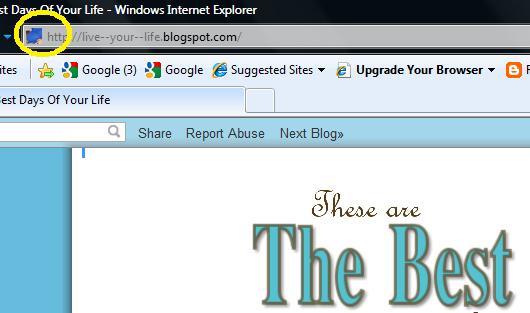
Favicons. The little images that show up right before the web address on some websites. This blog does not (yet) have one, but I made one for my Crafting blog when I redesigned it a few days ago, and I'm a big fan. Well, mine doesn't show up on Google Chrome. Favicons for other people's blogs do. But this is what my crafting blog favicon looks like in Internet Explorer:


They just personalize the blog just a little bit more and they can be so cute.

If you want to make your own favicon for your blog, it's super easy.

Here's a photo of my belly:


It's a horrible choice for a favicon, but I'm too lazy to find something better right now.

This photo has already been cropped for other reasons, but I need it to be square anyway. So use whatever photo editing program you have to make sure it's cropped square. Resize the photo as necessary because it can't be more than 100kb.

In blogger, go to your design, and the favicon option is right there at the top.


Find and upload your photo. Blogger will immediately let you know if the photo is too big or if it isn't perfectly square. If it works, it will show you your little favicon:


Save. And there it is. Your favicon.


Just choose a better photo than I did for my example. Something that's still recognizable when it's incredibly tiny.

Good luck!

Wednesday, September 21, 2011

How to get replies to comments you leave on blogs, and respond to your own comments

Everyone complains about it. No-reply commenters. 

I get all my comments sent to my email address. From there, I can just click 'reply' and respond to any comments. It's that easy. Except if you're one of those people who have their email hidden. Then when I try to reply to your comment email, it just gives me a no-reply email. 

If you think you might be one of those people (if you've commented on my blog a few times and have never received a reply, you probably are) here is how you can check, and change it. 


From your blogger dashboard, click on 'edit profile'


Under the privacy settings, check that 'Show my email address' box is checked. 

To the right, it shows which email address it will be sending the comments to. 

If you wish to change that email address, scroll down a little bit further, change the email address under 'Identity'. 


Don't forget to save your changes. 

Now if you don't get your comments emailed to you, here is how to set that up so you can reply to your comments easily. 

From your dashboard, click on settings. 


Under 'settings', click on 'comments'. 


Scroll down to the very bottom until you see the 'Comment Notification Email' box. Put your email address into the box, and click save. 


Now your comments will be emailed to you, and you simply have to respond to that email. Then you, too, can be annoyed when people are a 'no-reply' commenter and you can't respond to them.

It's that easy. 

Friday, April 8, 2011

Comment Vomit Free Zone


I do have a more serious post ready to go, but I felt this would make better 'Filler Friday' material.

Have you heard of Comment Vomit? Because this post is amazing and I couldn't agree more. 

"You're blog is awesome. Come follow mine." <---That is a basic example of Comment Vomit. Did that person read my post? It's possible, but highly unlikely. 

I'm all for following somebody back, if they put effort into reading my post. I'm even more inclined to follow them back if they follow without asking me to follow back. 

I deleted Comment Vomit for the first time today, and it won't be the last. 

If you don't care about what I have to say, don't follow, and don't comment. I'm not really about the numbers, I'd rather do without. 

So for those who visit just to get me to follow or comment back:
- If you don't read the post, don't comment on it, I will ignore
- If you're all about deals, reviews and giveaways?
I'm not into that no matter what you comment on my blog (sorry)
- Don't follow unless you like my blog
It's like being friends with someone you don't enjoy being around, just so you can say they are your friend. 


Vomit is actually a phobia of mine, so keep it off my blog, please. 

Tuesday, February 22, 2011

How to Get Me To Read Your Blog

Simple Ways to Get Me to Like, Immediately Leave, Or Never Visit Your Blog

  • Music. My computer sound is usually on mute. If it isn't, I better have a huge interest in your blog because otherwise I will close the window without giving you a chance. 

  • A lot of buttons, text, and other clutter all over your blog, I'm not a fan of. The only way it will stop me from reading your blog? If it's all at the top and I have to scroll forever to find where your posts are. The cleaner, the better. 

  • If you leave me a comment telling me you followed me, and would like me to follow back. Followers are great, but I'd rather have ones that can at least comment on one sentence I've written.

  • If you have a really great blog design, you can bet it will catch my eye and I will look around for awhile. 

  • But if I'm browsing your posts to see if I'll like your blog and the 4/5 posts are giveaway or review related - you won't get me as a follower. I prefer more real content. It should be at least 3 real posts for every 2 review/giveaway posts before I'll really want you showing up in my reader everyday. 

  • Humor. If I read something funny in the first little while that I'm on your blog, you probably won me. 

  • If you e-mail reply to my comment on your blog, I will immediately like you more and want to comment more, just because I know I'm acknowledged. I don't like commenting on blogs when I feel like the blogger doesn't care if I'm reading or not. If you reply to my comment through another blog comment, I'll probably never see it.

  • If you're not a follower of mine but you comment on my blog whenever I comment on yours, it also makes me want to visit your blog more. Who doesn't love attention?

  • You don't need to comment daily for me to appreciate it. Just a comment here and there makes me happy to know you are reading. 

  • If you post more than twice a day, especially a bunch of posts right after the other, I'll probably just skip right over all of them in my reader. If it's just one or two, I'll probably stop in to read. 

  • If you don't have a way for me to follow through Google Friend Connect, I might bookmark your blog on my computer, but I'll forget to visit. Call me lazy, but I mostly just read blogs through Google. It's easier. 

Just a quick explanation of how my blogging mind works. What are some of your biggest annoyances and likes of blogging?

Wednesday, January 12, 2011

Tutorial: Putting Archives on Own Page

One thing I really appreciate when reading blogs is their design and appearance. Now I'm not saying you have to go all out with your blog, just that the cleaner, more organized your page is, the more time I'm likely to spend there.

I recently played around with my blog design and while I was working at it I tidied up my sidebars. One feature that is so convenient and almost mandatory in my eyes is the 'Archive' gadget. It's the quick, easy way to look back at older posts. To find an old post you once read and wanted to read again. I love the convenient way of the archives. I just didn't like it on my sidebar anymore. And so here is how you can get your archives on a stand-alone page.

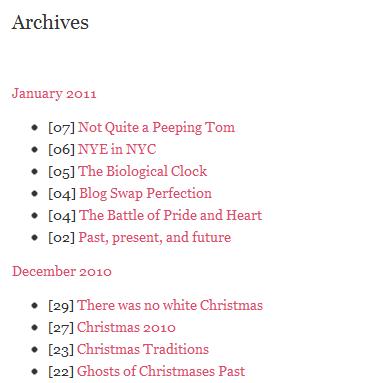
Here is what it will look like:


Step 1: Create the stand-alone page
  • Go to your dashboard
  • Click on the 'posting' tab
  • Click on edit pages 
  • Then click on new page


Step 2: Put in the Info
  • Name your new page 'Archives' or whatever you heart pleases
  • Click on the 'Edit HTML' tab
  • Insert the following code:  
<script style="text/javascript" src="http://abu-farhan.com/script/daftarisibloggerarchive/tocbyarchivemin.js">
</script>
<script src="http://YOURBLOGURLHERE.blogspot.com/feeds/posts/default?max-results=500&alt=json-in-script&callback=loadtoc">
</script>
  • Where you see 'YOURBLOGURLHERE', insert your blog name. Remove the '.blogspot' part as well, if needed* 


  • You can add whatever text you want before or after the code, if you'd like
Step 3: The End
  • Click 'Publish Page' and you are basically done
  • You will see the following options, and can choose if you want the page to appear in your sidebar, blog tabs, or choose 'No gadget' to link the pages manually, depending on your blog design **


* I've only tried it on my blogger-hosted website and do not know how it may work if you have your own domain and such. I am no expert. 

** I made and linked my blog tabs myself, so I pick 'no gadget' and use the link the buttons myself

 
Hope this helps. If you decide to try it, let me know how it works out :)

Thursday, December 9, 2010

Addiction: It's Worse than Twitter

I wanted to share with you guys something that I love.

It's not this time to advertise my blog, or twitter or anything, although I will share my link. I'm telling you guys about this simply because I really enjoy it, and maybe you will too.

It's called: The Blog Frog.

It's basically a community for bloggers. You can simply join, find people and communities that you like, and participate in discussions. It's a great way to chat with other bloggers about anything, without commenting on direction on their blog. It's also a good way to get a bit of traffic to your blog.

You can create your own community as well, about whatever you want, and be more in-control of the discussions. Here is my link:
I've wasted hours on there last night while at work, and again tonight It's a bit addicting. You've been warned. 

If you're already on it, give me your link to check out! If you're wanting to join here are a couple awesome communities to take a look at to get you started: 

Mama's Losin It

Let me know if you decide to join. It would be nice to get to chat with you outside of our blog comments : )

Ps. I did a guest blog post over at GameBlastron today. My first guest post ever! Read it and I'll love you even more than I already do :p

Wednesday, October 13, 2010

Some Stats, Anyone?


For the first time I reviewed my blog stats. Some of it actually surprised me.

Such as:

My most viewed posts
Songs That Annoy the #?*!^ Out of Me
Followed by the About Me page.
Third was probably my most personal post. What I'm looking for (in a guy).

My top 3 referring URLs were
Melissa's blog - My Life and How it's Going
Baby Sister's Blog - Le Esquina de la Estrellita
Tyler's Blog - Everybody Must Have a Fantasy

My 'link within' widget as well as blogger (go figure) were my top referring sites. I personally love the 'link within' widget on any blog I go to. I find myself reading all kinds of interesting posts on other blogs that way.

Top Searches that brought people to me:
Chocolate cocaine recipe
Best time of your life
The zoo tried out magnetic

33% of my visitors use Internet Explorer
25% use Google Chrome


More than 1000 of my viewers are Canadian
More than 800 are American
50 are from Denmark


Overall though, I'm not that popular of a blog. I just think this will be fun to look back on someday down the road, as I don't plan on ending my blogging any time soon. 

ShareThis

LinkWithin

Related Posts with Thumbnails