
One thing I really appreciate when reading blogs is their design and appearance. Now I'm not saying you have to go all out with your blog, just that the cleaner, more organized your page is, the more time I'm likely to spend there.
I recently played around with my blog design and while I was working at it I tidied up my sidebars. One feature that is so convenient and almost mandatory in my eyes is the 'Archive' gadget. It's the quick, easy way to look back at older posts. To find an old post you once read and wanted to read again. I love the convenient way of the archives. I just didn't like it on my sidebar anymore. And so here is how you can get your archives on a stand-alone page.
Here is what it will look like:
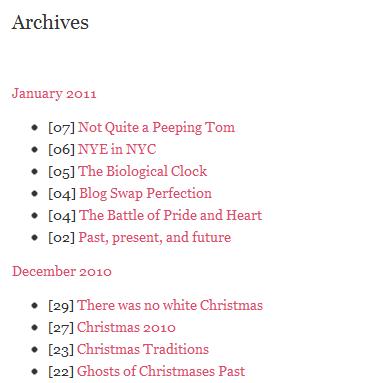
Step 1: Create the stand-alone page
- Go to your dashboard
- Click on the 'posting' tab
- Click on edit pages
- Then click on new page

Step 2: Put in the Info
- Name your new page 'Archives' or whatever you heart pleases
- Click on the 'Edit HTML' tab
- Insert the following code:
<script style="text/javascript" src="http://abu-farhan.com/script/daftarisibloggerarchive/tocbyarchivemin.js">
</script>
<script src="http://YOURBLOGURLHERE.blogspot.com/feeds/posts/default?max-results=500&alt=json-in-script&callback=loadtoc">
</script>
- Where you see 'YOURBLOGURLHERE', insert your blog name. Remove the '.blogspot' part as well, if needed*

- You can add whatever text you want before or after the code, if you'd like
Step 3: The End
- Click 'Publish Page' and you are basically done
- You will see the following options, and can choose if you want the page to appear in your sidebar, blog tabs, or choose 'No gadget' to link the pages manually, depending on your blog design **

* I've only tried it on my blogger-hosted website and do not know how it may work if you have your own domain and such. I am no expert.
** I made and linked my blog tabs myself, so I pick 'no gadget' and use the link the buttons myself
Hope this helps. If you decide to try it, let me know how it works out :)

